Loan Amortization Calculator
- Johan
- Streamlit apps
- March 18, 2026
Table of Contents
Understanding how your loan payments break down between interest and principal matters for financial planning. Knowing where your money goes each month makes for better decisions. So I built an interactive loan amortization calculator that visualizes exactly how your payments are allocated over time.
The application uses Python, Streamlit for the web interface, and Plotly for interactive charts. Most of our apps will use Streamlit.
What is Loan Amortization?
Loan amortization is the process of paying off a debt through regular payments over time. Each payment typically consists of two portions: interest (the cost of borrowing) and principal (paying down the actual loan amount).
Early in the loan term, most of your payment goes toward interest. As time progresses, more goes toward principal. This creates a pattern worth visualizing.
Core Functionality: The PMT Function
At the heart of any loan calculator is the payment calculation. We’ve implemented Python’s equivalent of Excel’s PMT function:
def pmt(rate, nper, pv, fv=0.0, t=0):
    # Special case: if interest rate is 0
    if rate == 0:
        return -(pv + fv) / nper

    r1 = (1 + rate) ** nper
    return -(rate * (pv * r1 + fv)) / ((1 + rate * t) * (r1 - 1))
This function handles a critical edge case that many implementations miss: a zero interest rate. When the rate is zero, the standard formula causes a division by zero error. Our implementation detects this and simply divides the principal by the number of periods—exactly what should happen with no interest.
Building the Amortization Schedule
The generate_amortization_schedule() function creates a complete DataFrame tracking every payment across the loan’s lifetime:
- Period: Payment number (1, 2, 3…)
- Opening Balance: Principal remaining at the start of the period
- Payment Amount: The fixed payment (usually constant)
- Interest Portion: How much goes to interest
- Capital Portion: How much reduces the principal
- Closing Balance: Principal remaining after the payment
For each period, we calculate the interest owed on the opening balance, the capital portion (payment minus interest), and the new closing balance (opening balance minus capital). This continues until the loan is fully paid off.
Interactive Visualizations
Numbers in a table are useful, but charts make the patterns readable at a glance. The calculator includes two key charts.
Payment Breakdown Chart
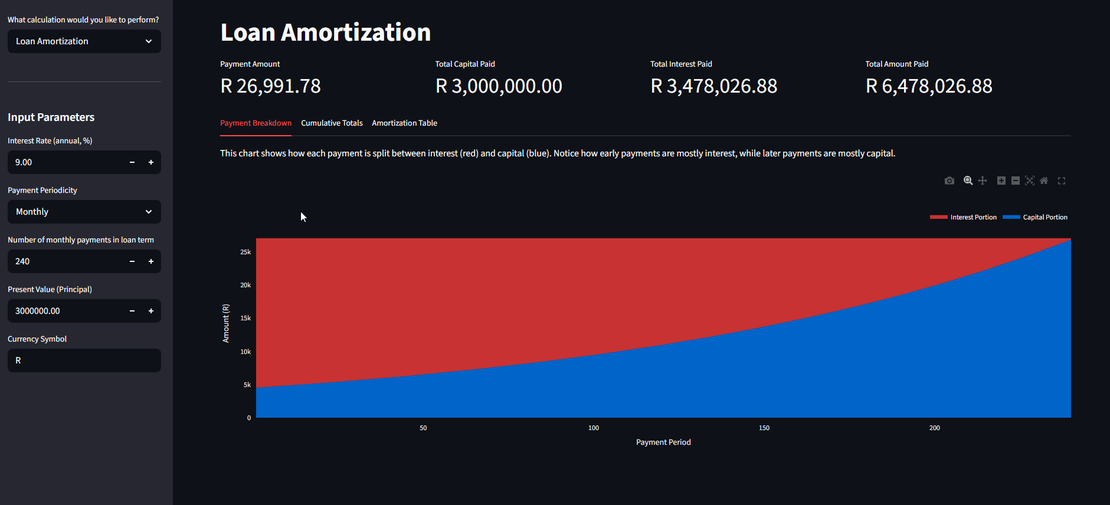
This stacked area chart shows how each payment splits between interest (red) and principal (blue). For a typical 20-year mortgage at 9% interest, your first payment is around 80% interest and only 20% principal. By the final payments, that ratio flips—nearly 100% of your payment goes toward principal.
Cumulative Totals Chart
The second chart tracks cumulative payments over time. Two lines show total principal paid (blue) and total interest paid (red). The gap between them is your total interest cost. Useful for questions like “How much interest will I pay in the first 5 years?” or “At what point have I paid more principal than interest?”
UI Design
The calculator offers two modes:
Standard Payment Mode: Quickly calculate your payment amount given loan terms.
Loan Amortization Mode:
- Summary metrics showing total interest, total principal, and total payments
- Three tabbed sections: Payment Breakdown chart, Cumulative Totals chart, and detailed Amortization Table
- Customizable currency symbol (defaults to “R” for South African Rand)
- CSV download for the complete schedule
All inputs sit in the sidebar, keeping the main area focused on results and visualizations.
Handling Multiple Payment Frequencies
Loans use different payment schedules: monthly, quarterly, semi-annual, or annual. The periodicity_mapping handles this:
periodicity_mapping = {
    "Monthly": 12,
    "Quarterly": 4,
    "Semi-Annual": 2,
    "Annual": 1,
}
Selecting a frequency converts the annual interest rate to the periodic rate and updates the schedule. A 9% annual rate becomes 0.75% monthly, 2.25% quarterly, 4.5% semi-annually, or stays 9% annually.
Conclusion
The app runs in a browser, requires no installation, and updates instantly as parameters change. Load it, enter your loan terms, and see exactly what the borrowing costs you.